


UNITAF Future
UNITAF

Caution

This site is a work in progress

This site is finished to different degrees. Feedback is welcome. Please bear in mind that most of what you see, if not everything, is still a work in progress.

Data from the live site is synced here every hour. Anything you do on this site stays here. It is not copied back to the live site until we switch over.

Discord and permissions are linked. Be careful with admin actions. Some of them also change Discord.

UNITAF members taking orders before an operation
Force Manual

The FM outlines our core skills, policies and guides to ensure every member stands ready for the mission ahead.

FM/G360 · Contributing to UNITAF

Overview of the UNITAF Roadmap

Passages
2
Reading time
3 mins
Views
71
Owned by
Unit Command
Platforms
Every platform
Published
23 Sep 2026
On this page

What is the Roadmap?

The Roadmap is where we shape the future of UNITAF together. It's a shared space where anyone in the unit can submit ideas, proposals, and suggestions, and where we collectively work through them in a structured, transparent way.

Think of it like a shared noticeboard with a built-in workflow. When someone has an idea, whether it's a change to how we run operations, a new training programme, a policy update, or a technical improvement, they submit it to the Roadmap. From there, it moves through a series of stages while the right people weigh in, discuss, and ultimately decide whether and how to move forward.

Everything on the Roadmap is visible to the unit. You can see what's been proposed, what's being discussed, what's been approved, and what's in progress. Nothing happens behind closed doors.

Why do we have it?

UNITAF is a volunteer organisation, and that means the people doing the work should have a say in what gets done and how. The Roadmap gives us a fair, open process for that. It means:

  • Anyone can put forward an idea. You don't need a particular rank or role.
  • Ideas get proper consideration rather than being lost in a chat channel.
  • There's a clear record of what was proposed, what was decided, and why.
  • The people responsible for each item are visible, so you always know who to talk to.

The Roadmap is administered by J11 Command Support, who manage the templates, oversee the process, and keep things running smoothly.

Whether you're submitting something new or just keeping an eye on what's happening, the Roadmap is the best way to stay connected to how UNITAF is evolving.
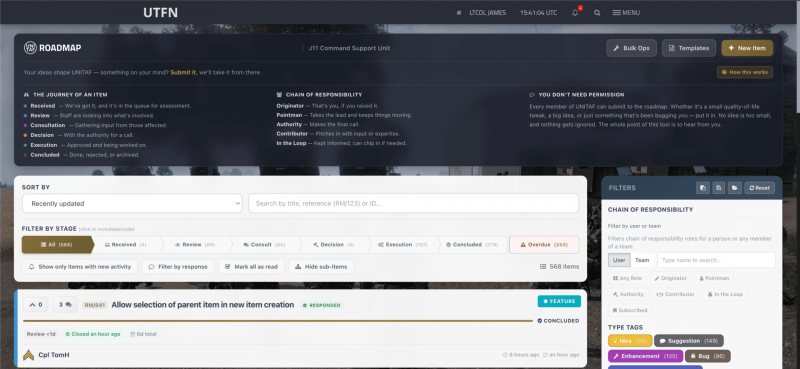
Overview of the UNITAF Roadmap

Finding Your Way Around

When you open the Roadmap, you'll land on the main list view. This is where all current items are displayed, each one shown as a card with its title, reference number (like RM/42), current stage, tags, and vote count.

The item list

The centre of the page shows all Roadmap items that match your current filters. By default, you'll see items sorted by most recently updated. Each card gives you a quick snapshot: what the item is, which stage it's in, who submitted it, and how the unit has voted on it.

Click any item to open it and see the full details, including its description, the Chain of Responsibility, comments, related items, and more.

Filters and sorting

Along the top, you'll find the filter bar. This lets you narrow down what you're looking at:

  • Stage buttons - These are three-state buttons. Click once to include only items in that stage. Click again to exclude items in that stage. Click a third time to clear the filter. You can combine multiple stage filters at once.
  • Search - Type a keyword to find items by title or description.
  • Sort - Change the order: most recently updated, newest first, most voted, or alphabetical.
  • Quick filters - Show only items with unseen changes, filter by items you've commented on, or hide child items to keep things tidy.

The sidebar

On the right, you'll find additional filters for narrowing by tags (like which area of UNITAF the item relates to) and by responsibility (items you're assigned to, items you're following, or items involving a particular person or team). You can also save your favourite filter combinations as presets, which is covered in more detail later in this guide.

The RM/ reference

Every Roadmap item has a unique reference number like RM/42. You can use this to reference items in Discord, and it'll link through automatically. You can also copy an item's reference directly from the list by clicking the copy icon next to it.

Next in Contributing to UNITAF

FM/G361 Submitting an Item