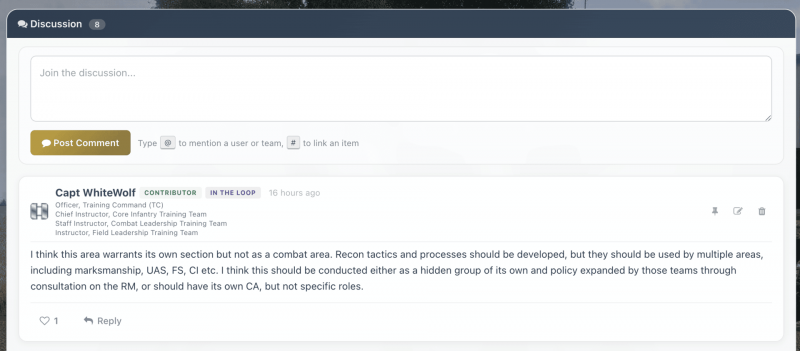
Discussion and Updates
Every Roadmap item has two types of conversation: Updates and Discussion.
Updates
Updates are official posts from the people responsible for the item: the Pointman, Authority, Contributors, or the Originator. They're used to communicate progress, decisions, changes, and next steps.
If you're assigned a responsibility role on an item, posting regular updates keeps everyone informed and shows that things are moving. Updates can be pinned to highlight important information.
Discussion
Discussion is open to anyone once the item moves past the Received stage. This is where the broader unit can weigh in: ask questions, raise concerns, share relevant experience, or offer suggestions.
Discussions are threaded, so you can reply directly to someone's comment and keep related conversations together. You can also like comments to show agreement or appreciation without adding noise.
Mentions and references
In both Updates and Discussion, you can mention people and reference other Roadmap items:
- Mention a person - Type @ followed by their username to tag them in your comment. They'll be notified.
- Mention a team - You can also mention entire teams to notify all members.
- Reference an item - Use the RM/ format (like RM/42) to create a clickable link to another Roadmap item. This is useful when items are related or when you want to draw attention to something relevant.
Editing and deleting
You can edit your own comments after posting them. If you need to remove a comment entirely, you can delete it, though it's usually better to edit and clarify rather than delete.