ATragMX setup: drop truing
Atmospheric drag of any object in motion is not a fixed value, rather it changes significantly depending on speed. The transition from supersonic to subsonic velocities in particular can produce a vast difference in atmospheric drag, which becomes a relevant consideration for sniper teams engaging at extended distances.
The singular C1 ballistic coefficient provided by the arsenal (measured at the muzzle) only accurately accounts for close and moderate distances.
To ensure accurate bullet drop at all ranges, we will need three data points input into our ATragMX:
- The starting C1 ballistic coefficient per ATragMX setup: C1 ballistic coefficient FM/BG-562
- The C1 ballistic coefficient at a transonic range
- The C1 ballistic coefficient at a subsonic range
Fortunately, the ATragMX will provide us with the additional data, all we need to do is take shots at prescribed ranges and input the bullet drop.
Resetting the Drag Coefficient Table
The ATragMX may autogenerate a ballistic coefficient table. We will clear this to ensure accurate manual entry.
To open the Drag Coefficient Table, Options > Drag Coef Table
- Press “Clear”
- Press “Done”
Transonic Ballistic Coefficient
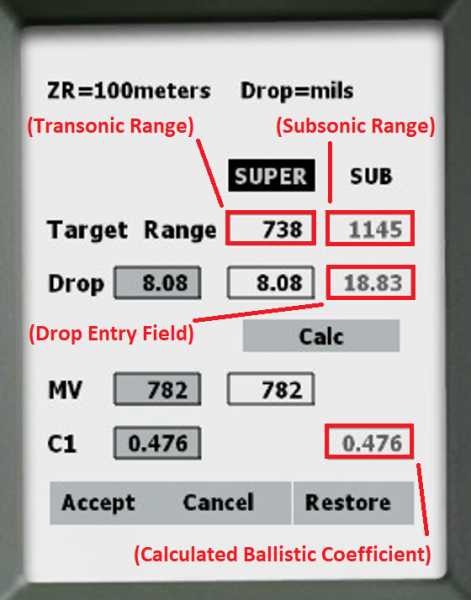
To open the drop truing tool, Options > Truing Drop.
- Press “Restore”
- The Target Range distance under the “Super” Column will be auto-populated with the transonic distance.
- In Eden, set a target at this distance and record the actual bullet drop.
- Enter the auto-populated transonic distance in the “Sub” target distance column
- Press "Calc" to recalibrate fields.
- Enter the recorded drop value in the “Drop” field, still in the “Sub” column.
- Press "Calc" to generate a new ballistic coefficient.
- Press “Accept” to auto-populate this number into the BC Table.
Subsonic Ballistic Coefficient
To open the drop truing tool, Options > Truing Drop.
- Press “Restore”
- The Target Range distance under the “Sub” Column will be auto-populated with the subsonic distance.
- In Eden, set a target at this distance and record the actual bullet drop.
- Press “Restore” to ensure the auto-populated subsonic distance is accurate.
- Enter the recorded drop value in the “Drop” field under the “Sub” column.
- Press "Calc" to generate a new ballistic coefficient.
- Press “Accept” to auto-populate this number into the BC Table.