


UNITAF Future
UNITAF

Caution

This site is a work in progress

This site is finished to different degrees. Feedback is welcome. Please bear in mind that most of what you see, if not everything, is still a work in progress.

Data from the live site is synced here every hour. Anything you do on this site stays here. It is not copied back to the live site until we switch over.

Discord and permissions are linked. Be careful with admin actions. Some of them also change Discord.

UNITAF members taking orders before an operation
Force Manual

The FM outlines our core skills, policies and guides to ensure every member stands ready for the mission ahead.

FM/BG-627 · v1.03

ATragMX: moving targets

Code
FM/BG-627
Kind
Guide
Version
v1.03 2yrs ago
Views
336
Platforms
As its document
Published by
SP3 Jochem 5 Jul 2024
Last material change
v1.00

ATragMX: moving targets

The ATragMX offers a time expedient and field-practical tool to accurately eliminate moving targets, even when target speed is unknown. To open the speed estimation tool, navigate to:

  • Options > Target Speed Est
  • Enter range in “Target Range” box


Decide upon a number of MRADs to time the target against.

  • Enter this number in the “Num Ticks” box.
    • Ensure tick units are set to "MIL".
  • Time the target movement by pressing the “Start” button.
    • Press “Stop” when the target has travelled the decided number of MRADs.
  • Press “Done” to auto-populate target speed.
    • The final firing solution will be automatically updated.

Tip: This tool is best utilized in a team context, one observing target movement and calling “start/stop”, and the other working the ATragMX.
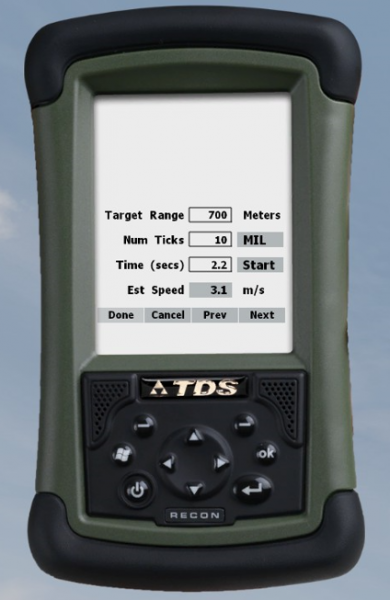
ATragMX Speed Estimation screen

Where it appears

On role cards

On 2 role cards in 1 combat area.

By combat area