Set up a short range
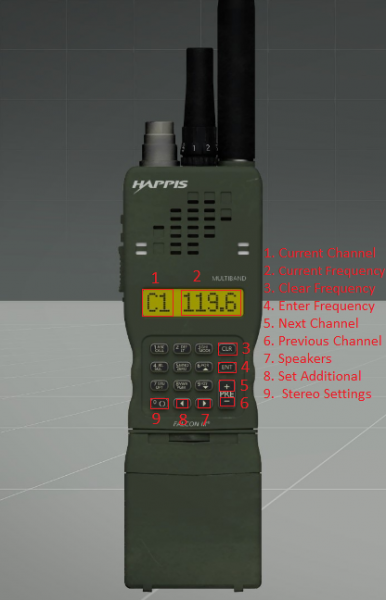
During any operation that requires it, you'll be provided with an AN/PRC-152. It is the short range radio used by all elements. To set up your main frequency:1. Check with your leader or in the orbat what frequency you should be on2. Hover with your mouse on your current frequency (2) and type the wanted frequency; eg. 372. 3. Click the ENT (4) button to enter the frequency. 4. Check in with your team to see if the radio is working properly.
Using the AN/PRC-152 you can also set up an additional frequency to communicate with other elements that aren't your own.To set up an additional frequency:1. Click the + button (5) to select the next channel.2. Click the left arrow button (8) to set an additional channel. At this point you should read AX (X being the channel number) instead of CX, next to the frequency number.3. Type the wanted frequency you want to use as additional; eg. 3704. Click the ENT (4) button to enter the frequency.5. Click the - button (6) to return to your main frequency.
Now you should be able to hear both frequencies. If you wanna dictate in which ear you want the audio to come out from, select the frequency you want and click the 0 (9) button to modify the stereo settings. On the bottom right you'll see an indicator that says either "left", "right" or "left and right".